stand-alone-cross-development-tools-grafik stand-alone-cross-development-tools

EUROS cross development environment:

  • tools that allow you to build applications
    more comfortably and efficiently.

EUROSkit

A number of different develpment environments are available for embedded applications. These either come as specialized solutions that are only compatible with certain development tools, or they're designed as stand-alone development environments.

The former kind of development environments are often quite uncomfortable because they offer only limited functionality and are adapted specifically for one CPU architecture.

Stand-alone development environments offer a larger set of functions, but are not well suited to use different development tools. For example, error messages from the compiler must first be loaded with an editor to find the error location manually.

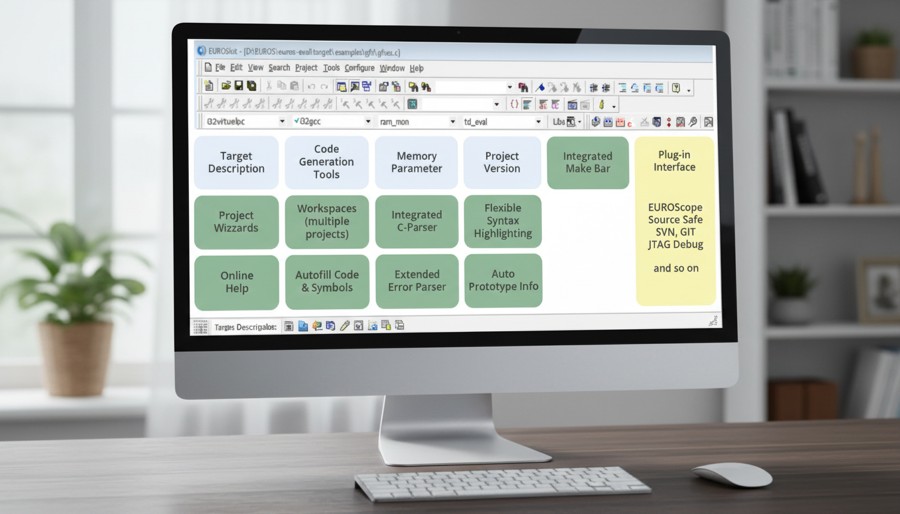
With EUROSkit a comprehensive stand-alone cross-development environment is now available, based on a powerful editor with project manager, integrating all development tools. There is special support for developing EUROS application with EUROSkit.

These are the EUROSkit advanced features:

  • Integrated C parser

    C code is analyzed in real-time and is represented in a structured form by the class view. When typing in a variable available member variables are provided in a listbox.

  • Extended Error Parser

    Messages originating from the build process are displayed in a special window. Independent from the development tools the user can select a message and is directed to the corresponding location in the source file.

  • Makebar

    When building an EUROS application a flexible build process based on GNU make is running in the background. Using the so-called "Makebar" the four makefile parameters "target hardware", "toolset", "application variant" and "library variant" are selected. EUROSkit automatically detects the options available on the development system and offers these in the four Makebar lists.

  • Auto Prototype Info

    When typing the name of a EUROS API function or of any other function of the project, a tool-tip window containing the prototype of the function is displayed.

  • Auto- and Code-Completion

    EUROSkit knows all identifiers in the project. When typing code a phrase can be completed automatically based on these identifiers.

  • Flexible Syntax Highlighting

    C source files and header files are highlighted. The user can add custom syntax descriptions.

  • Project Wizard

    New EUROS projects can be created using the Project Wizard. With a few parameters given by the programmer it generates a template project that can be immediately used as an application.

  • Integrated online help

    The structured help system contains descriptions of all EUROS services.

  • Workspaces

    EUROSkit can manage multiple projects as a single workspace. This feature can be used to better organize project structures.

  • Plug-In interface

    Various development tools like SourceSafe or EUROScope can be integrated into EUROSkit.

Due to comprehensive support when developing EUROS applications the user can fully concentrate on application problems. Time-consuming searching for function prototypes and locating compile errors are a thing of the past. Developing EUROS applications becomes more efficient and offers a better overview.


Downloads

pdf EUROSkit


EUROS - Downloads

Contact

News